
Best High Quality 10 Inch Multiparameter Patient Monitor Quotes – H9 Multi Parameter Patient Monitor – Hwatime

Best High Quality 10 Inch Multiparameter Patient Monitor Quotes – H9 Multi Parameter Patient Monitor – Hwatime Detail:
Quick Details
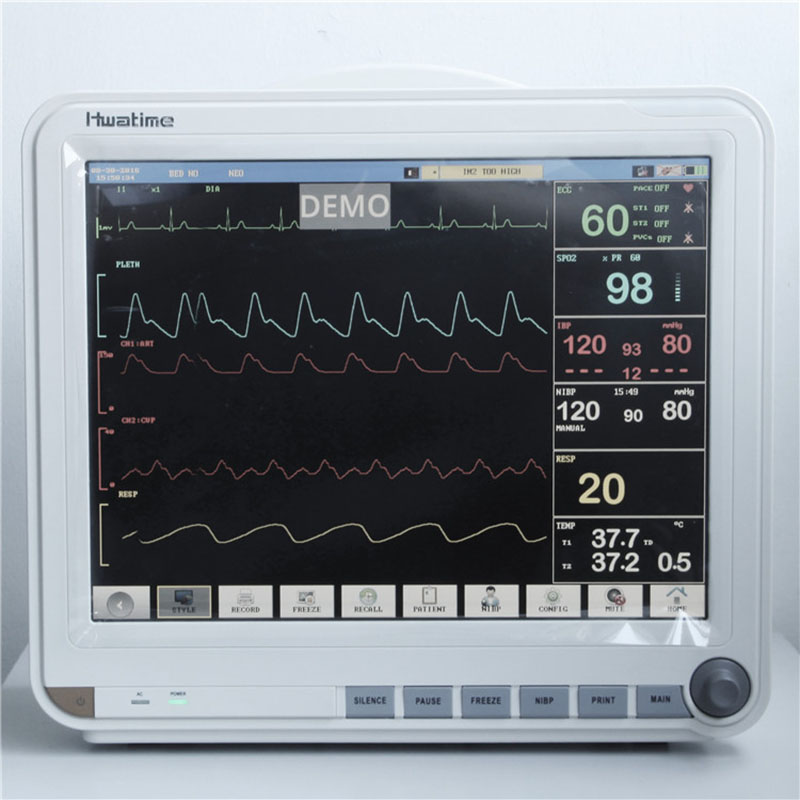
Quality Certification: CE&ISO
Display: 15inch color screen, Multi-language interface
Battery: AC/DC, built-in rechargeable lithium battery
OEM: Available
Application: Bedside/ICU/OR, Hospital/Clinic
Supply Ability: 100 Unit/Per Day
Packaging & Delivery:
Packaging Details
One main unit Patient monitor, one NIBP cuff and tube, one Spo2 sensor, one ECG Cable, one ground cable and Disposable ECG Electrodes.
Product packaging size (length, width, height): 460MM*295MM*410MM
GW: 6.5KG
Delivery Port
Shenzhen, Guangdong
Lead Time:
|
Quantity(Units) |
1 - 50 |
51 - 100 |
>100 |
|
Est. Time(days) |
15 |
20 |
To be negotiated |
Product Description
| Screen Display Details | The monitor provides four kinds of screen display styles including standard screen,trend screen,oxyCRG screen, viewbed screen, big font screen and NIBP list screen. You can select any screen to display follow these steps: |
| 1)Enter MONITOR SETUP menu. | |
| 2)Rotating the knob to the FACE SELECT option and press the knob. | |
| 3)Rotating the knob to the screen option you need. | |
| 4)Press the knob,and you can see that the screen display has been changed to the one you set. | |
| In the following screens, you can make some settings. | |
| Trend screen | |
| On the left side of the waveform area, continuously shows graphic mini-trends of the parameters. | |
| In each field, the label,scale and time are respectively displayed at the top,left and bottom. You can select a filed and press the knob to switch the parameter. | |
| OxyCRG screen | |
| The oxyCRG area covers the lower part of the waveform area and shows HR trend, SpO2 trend and RR trend (or RESP wave). Select the oxyCRG area and press the knob, you can enter oxyCRG setup menu to setup compression time and compression wave. | |
| Big font screen | |
| You can select four parameters to view according to your needs. For parameters having a waveform,the waveform will also be displayed. | |
| To select your desired parameters: | |
| 1)Enter USER MAINTAIN menu. | |
| 2)Enter BIGFONT SCREEN MODULE SWITCH menu. | |
| 3)Set the four modules to your desired parameters or set it to off (“OFF” means that this module area is blank). The location of the parameter on this menu represents the their location on the screen. |
Product detail pictures:


Related Product Guide:
We usually continually offer you the most conscientious consumer services, along with the widest variety of designs and styles with finest materials. These initiatives include the availability of customized designs with speed and dispatch for Best High Quality 10 Inch Multiparameter Patient Monitor Quotes – H9 Multi Parameter Patient Monitor – Hwatime, The product will supply to all over the world, such as: Pakistan , Myanmar , Nepal , We are trying our best to make more customers happy and satisfied. we sincerely hope to establish a good long-term business relationship with your esteemed company thought this opportunity,based on equal, mutual beneficial and win win business from now till the future.
 By Christine
from Karachi
- 2018.09.16 11:31
High production efficiency and good product quality, fast delivery and completed after-sale protection, a right choice, a best choice.
By Gail
from United Arab Emirates
- 2018.06.26 19:27


